


Read and reply to reviews
Review ratings for delivered orders and reply from the location.
After receiving an order, customers can leave one review with a one-to-five-star rating and an optional comment. Each order can have one review. Under Reviews, your team can read reviews and reply on behalf of the location.
A review is linked to the customer's order. Viewing the menu or having a pending or cancelled order is not enough. The session or tracking access must belong to the person who placed that order.
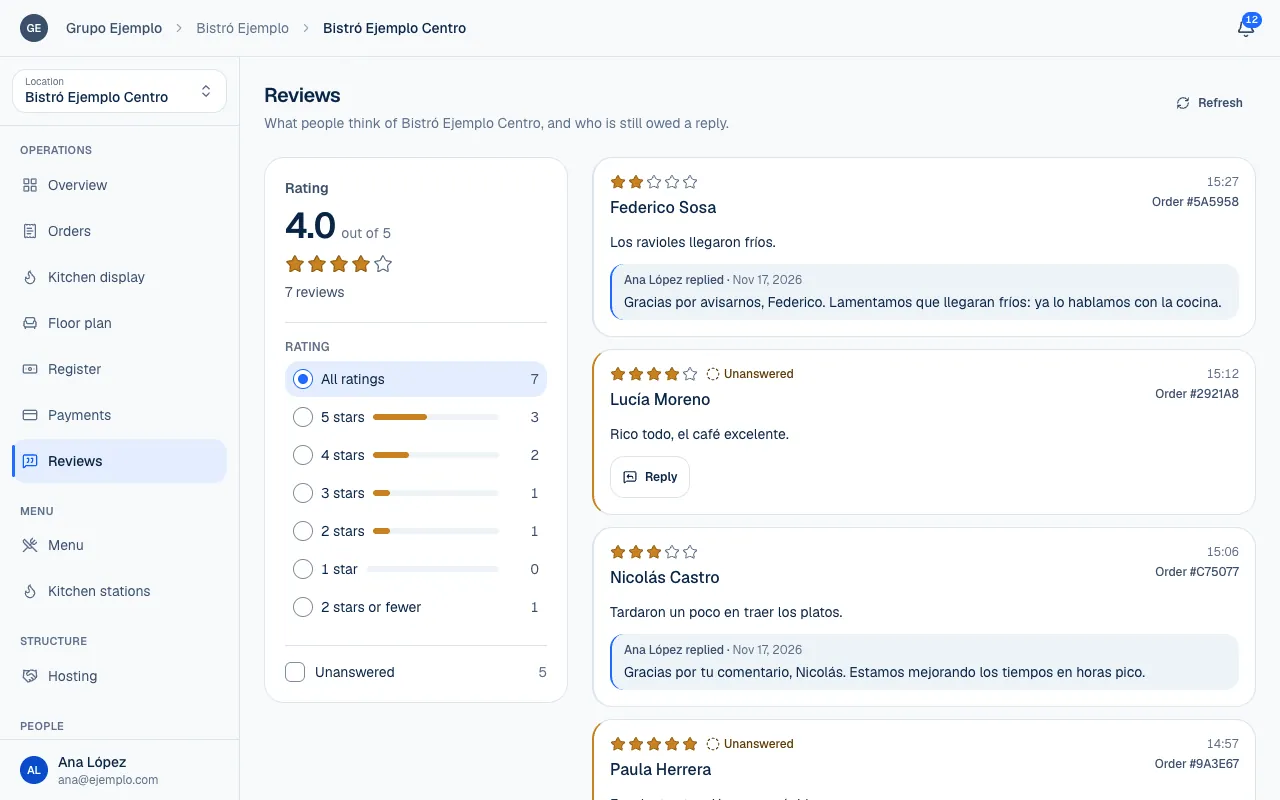
Review the ratings
- Choose the location and open Reviews.
- Check the Rating, number of reviews and star distribution.
- Review To answer and 1 and 2 stars to decide where to start.
- Use Show → Unanswered or Rating to filter the list.
| Detail | What it is for |
|---|---|
| Rating | Understand the average alongside the number of reviews behind it. |
| Distribution | See how many reviews have each rating. |
| Unanswered | Find reviews waiting for a team reply. |
| 2 stars or fewer | Review experiences that may need special attention. |
| Order | Identify the order that the review is about. |
A review may say Left a rating only, with no comment. This is not a loading error. If the comment is long, Read all opens the full text. Select Clear filters if you cannot find a review you expected.
Reply from the location
Open Reply on the review and write Your reply. Thank the customer for sharing their experience and, if something went wrong, explain what you will review or improve. Use details from the order to add context without exposing personal information in the reply.
Reread the text and select Send reply. The review shows who replied. You need the right permission to reply; being able to read reviews does not mean you can write on behalf of the location (Roles and permissions). What customers see when they leave one is in Leave reviews and use your account.
Review locations from a brand
Under Reviews at the brand, you can see reviews from its visible locations. Use Location to filter them, and see the Brand rating in the summary. This view is read-only. To reply to a review, open the relevant location.
Permissions still apply at each location. If reviews are missing or you cannot take an action, first check the filters, then ask whoever manages the team to review your access.
Follow up on issues
A low review can notify people with the right access who have enabled the notice. Under Overview, the latest critical review and the unanswered review recommendation help you return to these cases. The low-rating alert uses a recent period, so it may differ from the overall average under Reviews.
Reviews and replies remain in the record; they are not deleted to change the rating. Resolving an issue with the customer and explaining the location's response leaves a clear record of what happened and how the team handled it.
If something isn't working
- Someone else already replied to this review. Only one reply is published per review. Use Copy my reply if you want to keep your text.
- A reply can be up to 2000 characters. Shorten the text and select Send reply again.
- Write a reply before sending it. Your reply is empty.
- The reply couldn't be sent. Try again. Wait a moment and send it again. First, reload to see whether it was already published.
- You do not see Reply: your role lets you view reviews but not reply to them (Roles and permissions).
If the problem continues, email support@piqero.app (opens in a new tab). Help and support lists what to include.