


Order without an account
How to order as a guest with just your name, which screen you see before paying, how to follow your order and how to switch to an account later.
You do not need an account to order. You can browse the menu and build your cart without identifying yourself; to pay, being a guest is enough: Piqero only asks for your name.
When it asks you to identify yourself
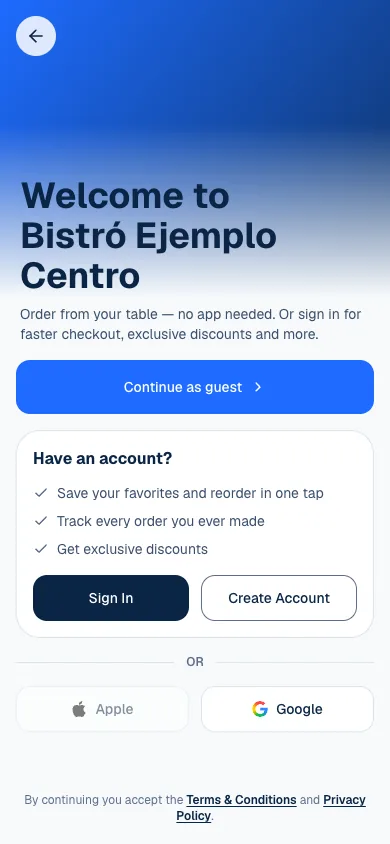
The menu opens without a session and the cart is kept on your phone. The first time you tap Checkout in your cart, the menu takes you to a welcome screen for the location, with three ways forward: Continue as guest, Sign In or Create Account. If you were already signed in with an account, you do not see it: you go straight to payment.
Order as a guest
- On the welcome screen, tap Continue as guest.
- Enter your name where it says How should we call you?.
- Tap Start ordering.
- You return to payment with the cart as you left it. Choose how to receive the order, the payment method and tap Pay.
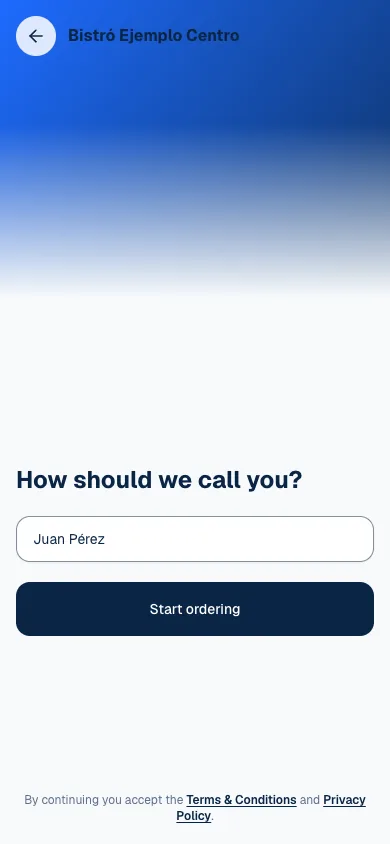
Your name is the only thing we ask for: no phone and no email. The team sees it next to the order, in Orders and in the Register, so they know who to hand it to and charge. From here the journey is the one of any order: build and confirm it, pay and tip and follow it.
What to expect from a guest session
| You can | How it works |
|---|---|
| Order and pay | With the methods the location offers. |
| Follow the order | From View order or History, in the same browser. |
| Leave a review | When the order is Completed and you still have access to it. |
A guest session lives in the browser where you created it. If you sign out, clear the browser's data or switch phones, you may not find the order: if you ordered for a table or for pickup, show the location's team the number at the bottom of the order screen (Order #…).
Switching to an account later
Under Me you will see You're browsing as a guest. Tap Sign in or create account and identify yourself with your phone or your email and the verification code. Do it from that same session: the orders you placed as a guest move to your account. More in Leave reviews and use your account.
If it will not let you order
Being able to see the menu does not guarantee the location is taking orders: it may be closed, paused or have tables turned off. The notice on the menu explains why and, when there is one, when it is back. Scan and browse the menu covers it.
If something about your order isn't right, talk to the location's team. If the page isn't working, email support@piqero.app (opens in a new tab).