


Pay and leave a tip
Choose an available method and check for confirmation before paying again.
Under Payment, review the Order summary, how you will receive it and the Total. Available methods depend on the location. You may see Mercado Pago for online payment or an option to pay at the counter. If an option is missing, you do not need to enter the order again. Ask what the place accepts.
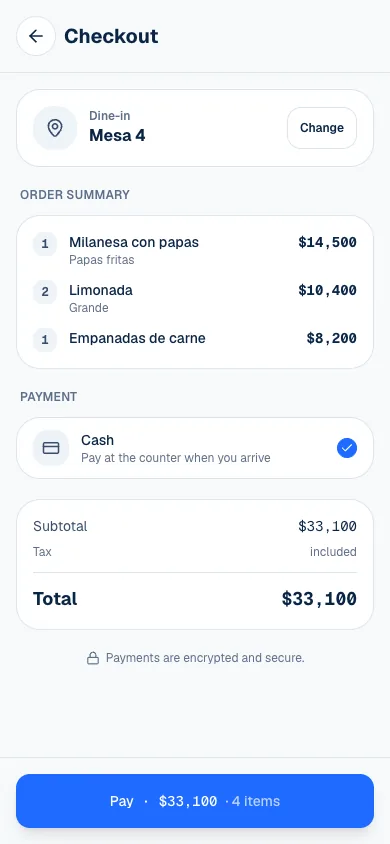
Choose how to pay
- From Cart, select Checkout.
- Check the table or pickup details and the product total.
- Choose a method the location offers.
- If paying online, review the Tip before continuing.
- Complete the payment flow and return to the order to check its status.
| Option | What happens |
|---|---|
| Mercado Pago | Open online payment and choose among the methods available in your account. |
| Cash | The order remains for payment at the location; the team records what they receive. |
| Pay at counter | Ask the team how to pay for the order. |
For a cart with products from several kitchens, combined online payment is not available: each kitchen has its own account and order. Cash appears as a combined option only when every kitchen accepts it. Otherwise, follow the instruction to ask at the counter.
The button and order result show how much remains due. If you chose cash, confirming the order does not record that you handed over money. Ask the team to charge the correct order.
Choose a tip
A Tip is optional. For online payment, choose No tip, 10%, 15% or 20%, or select Other and enter a Tip amount. The default is 10%, and you can change it before continuing.
Check the Tip line and final total. If the amount cannot be read, the screen asks you to correct it. The tip is added to the Mercado Pago charge but remains separate from the product prices.
If paying cash, agree on a tip with the person charging you at the location. The team can record it at the register, including when you leave the change as a tip. You do not need to add another product to represent it.
Return from Mercado Pago
Closing the payment provider's screen does not confirm a charge. In order tracking, Paid means the payment was recorded. Payment due means a balance remains, and Payment in progress means to wait while it is checked.
If the order is still due and Pay with Mercado Pago appears, you can resume payment from that order. The system checks previous attempts before offering another one; you do not need to create a new order with the same products.
If something isn't working
- Could not verify the payment. Try again in a few minutes. Wait and check the order again (Follow your order). A connection failure does not confirm or reject a payment.
- Could not open Mercado Pago. Please try again. Select Pay with Mercado Pago again from the order.
- Online payment isn't available right now — your order is placed; pay at the counter. The order already reached the location: pay for it at the counter.
If there was a refund, order tracking shows Payment refunded or Payment partially refunded. The location handles that correction on the original transaction.
For any question about a payment, talk to the location's team and keep the order number handy (Order #…, on the last line of the order screen). If the page is not working, email support@piqero.app (opens in a new tab).