


Compare locations
Read the overview for a brand or organization and compare each place on the same basis.
Overview brings together results and operations for places you can access. At a brand, you see its locations; at an organization, you can compare brands and locations. Each figure respects your permissions at each location.
Choose a view and period
- Choose the organization or brand with Switch place.
- Open Overview.
- Under Period, choose Today, Week, Month or Year.
- Find How each place is doing.
- At the organization, use Compare places to switch between Brands and Locations.
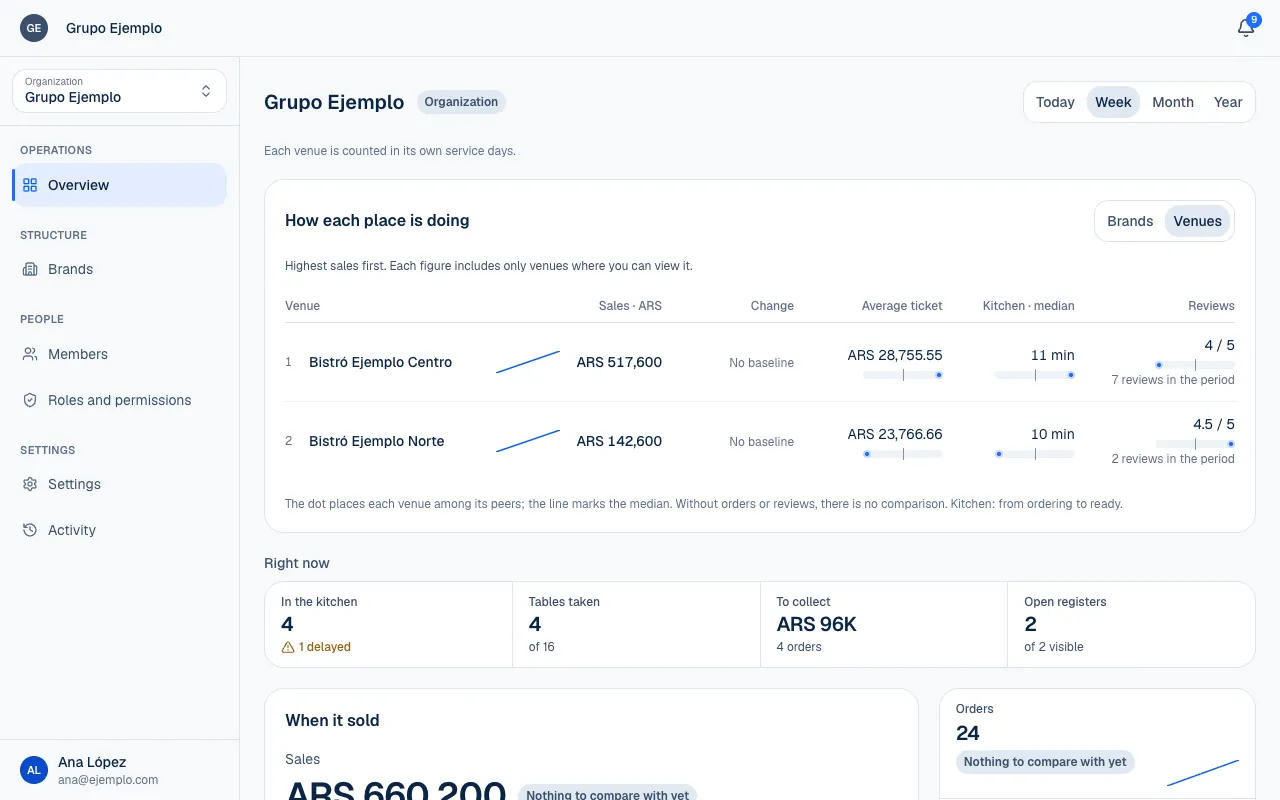
The week starts on Monday. Each branch is counted according to its own service days and time zone. A service that ends after midnight may still belong to the day it started.
Today is compared with a typical day on the same weekday, up to the same time, using the last four available days. Longer periods are compared with the same portion of the period before. If there is not enough history, No baseline or an explanation that there is not enough data appears.
Read the comparison
| Figure | How to read it |
|---|---|
| Sales | Amount sold during the period at locations you can see. |
| Orders | Number of orders behind the result. |
| Average order | Average amount per order. |
| Change | Difference from the comparable period. |
| Kitchen · median | Half of the orders were ready in this time or less. |
| Reviews | Rating for orders that received reviews. |
| Open registers | Shifts that are still open among visible registers. |
The list is sorted by sales when you can view them; without sales access, it may be sorted by name. Comparisons with other locations help you place a result relative to the median. If there are no orders or reviews, there is no comparison for that figure.
Currencies are not converted. If you work with more than one currency, check which currency the comparison uses before adding or comparing amounts.
Now and the selected period
Right now describes current work: In the kitchen, overdue orders, Tables taken, unanswered Calls and To collect. These are not totals for the week or month.
Period sections, by contrast, describe sales, kitchen, menu, customers, payments and reviews over the selected range. Collected may differ from Sales: an order may be paid later, and refunds and tips appear separately.
Turn a comparison into action
If a branch is down, review its own Overview (Read the overview), menu, hours and order status. If the kitchen is slower, check its times and stations. To review money due, open payments and the register if you have permission.
Use the comparison to decide where to look first. A location without enough data, with a service still in progress or in another currency needs more context before you assess the result.