


Read the overview
Choose a period and understand sales, kitchen, payments, customers and pending work.
Overview changes with the place you choose under Switch place. At a location, it describes its operations. At a brand or organization, it can bring together and compare the locations you can see. A shared space also shows its floor and hosted locations, within the scope of your access.
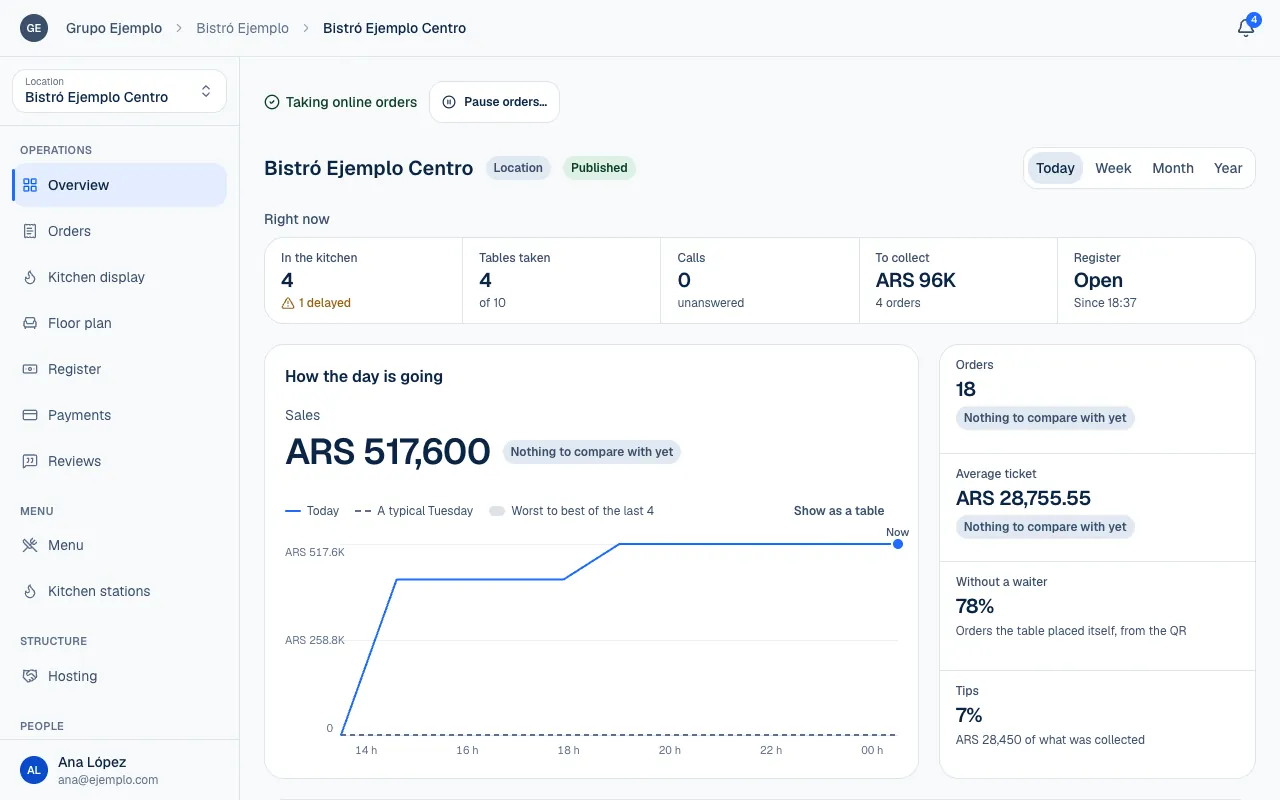
Choose a period
Week means the calendar week starting Monday, not the last seven days. Month and Year also follow the calendar. The current period is compared with the same portion of the previous one, so a partial month is not compared with a full month.
For Today, the comparison with a typical day uses the last four matching weekdays up to the same time in service. If there is not enough history, Nothing to compare with yet appears. This does not mean sales are down.
Understand each section
| Section | What it shows |
|---|---|
| Sales | Amount, Orders, Average ticket and Without a waiter, orders placed by scanning the table QR. |
| When it sold | The period's curve and comparison; choose Show as a table to see the data in a table. |
| How the day is going | Today's pace compared with a typical day and its previous range. |
| Kitchen | Time from order to ready, the median and 90th percentile, plus orders received by station. |
| Collected | Money received by method, with tips and refunds identified. |
| When it sells | Average orders by hour and day of the week. |
| Menu | Best sellers, Falling and Sold out now. |
| Customers | Identified customers, first visits and people who returned. |
| Team | Orders taken, sales, average order and tips from each person's payments. |
| Reviews | Rating, distribution and the latest critical review for the period. |
Collected may not match Sales: an order may be paid later or still have a balance due. Tips are separate from the sales amount. Customers identifies people who ordered with an account; a guest order does not provide the same confidence that someone has returned.
See what is happening now
Right now brings together In the kitchen, overdue orders, Tables taken, unanswered Calls and To collect, depending on your permissions. It shows current work, separate from the figures accumulated over the selected period. Alerts and recommendations are explained in Act on alerts and recommendations.
In a shared space, The space right now distinguishes tables with visible orders from tables with a QR order in progress. It does not count people or guarantee which tables are free. The directory shows opening hours and pauses; being open by schedule does not guarantee that online orders are available.
Each location uses its own service day, including shifts that close after midnight. Figures from different locations are not converted between currencies. Check the period, scope and currency before drawing a conclusion or comparing screenshots. To compare branches with each other, see Compare locations.