


Manage your subscription
Review trials, charges, plan changes and requests to reduce usage.
Under Settings → Plan, Your subscription shows the price, billing frequency, expiration and next charge. The same screen brings together the catalog, scheduled changes and subscription transactions. You need permission to change the plan. If you do not have it, Piqero tells you who to ask. What each plan includes is in Choose and review a plan.
Move from a trial to a paid plan
An available trial starts without a card and shows Free trial until…. Today only Starter has a trial: it lasts 30 days. Piqero notifies you before it ends. To continue with that plan, select Subscribe and authorize the automatic payment in Mercado Pago shown on screen.
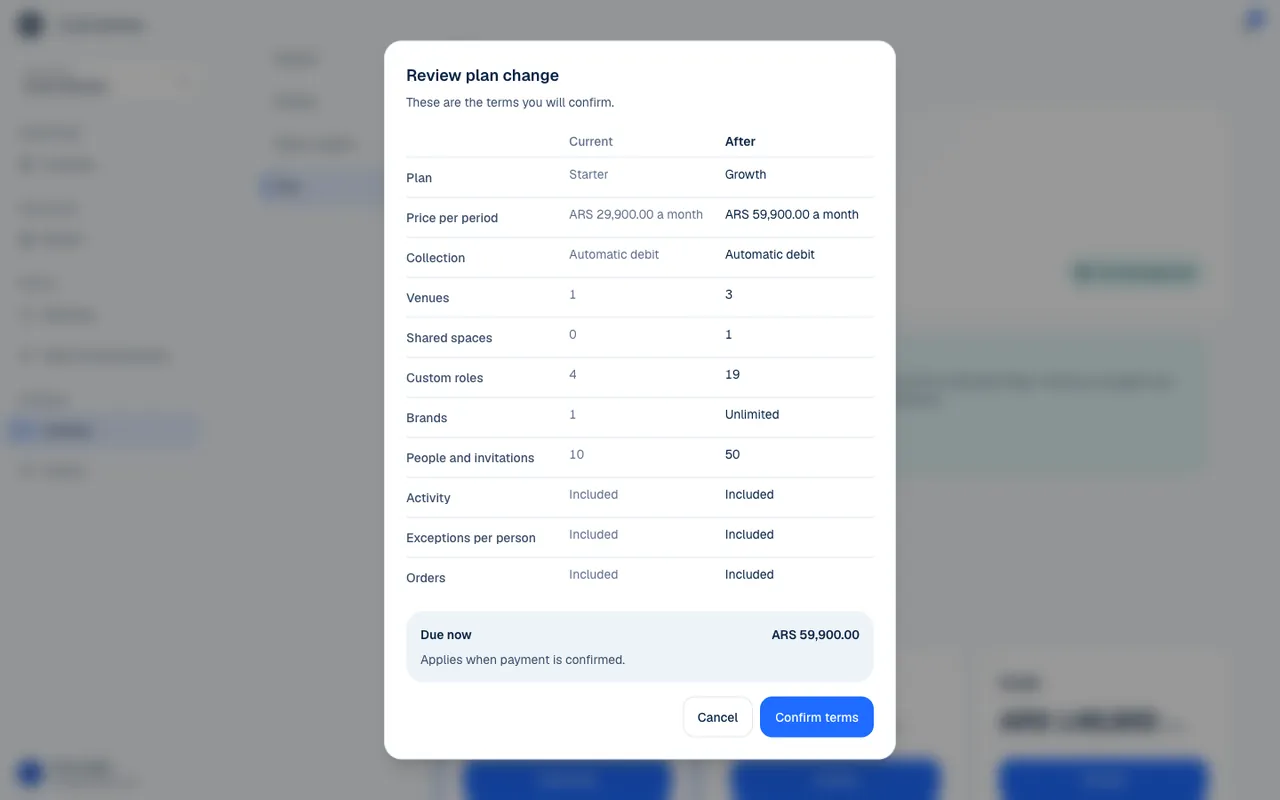
If you subscribe to the same plan during the trial, you are not charged right away; payments start when the trial ends. Choosing a different paid plan may start a change with an immediate payment. Always read the review for the plan you choose.
- Open Settings → Plan and review your trial or current period.
- Choose a plan and Monthly or Yearly billing.
- Under Review plan change, compare Now, After and Due now.
- Confirm and complete the authorization or payment in Mercado Pago, if required.
- Return to Plan and check the result. Opening the payment screen does not activate the change.
When a change takes effect
| Change | When it takes effect |
|---|---|
| From no payment to a paid plan | When the first authorized payment arrives. |
| Upgrade | When the prorated amount for the rest of the period is credited. |
| Same price with at least as much coverage | It may take effect when you confirm. |
| Lower price | At the next renewal. |
| Different billing frequency | At the next renewal. |
A plan that requires new payment does not change before the payment arrives. A scheduled change keeps the current plan until the date shown. Select Keep … to cancel the scheduled change. If there is a pending payment, Keep the plan lets you review cancelling it.
Charges and failed payments
Change payment method opens the automatic payment settings. Use it to update how the subscription is paid. Charges shows the first payment, upgrades and renewals with their statuses. Waiting for payment does not mean Charged.
If coverage expires without a renewal payment, the organization uses the features and limits in No plan. A paid period, or a trial with the automatic payment already authorized, has a 5-day grace period before moving to No plan; a trial without one ends the day it expires. The menu stays public and you can complete existing orders. Locations without coverage stop receiving new orders, counter orders included; a hosted location may still be covered by its host space's plan. Expiration does not delete data. How this shows at a location is in Configure orders.
Coordinate a usage reduction
Usage by place shows counts of people and custom roles without listing names. A person may count in several places there, but counts only once in the organization's total.
Under Ask to reduce, choose a resource, target amount and reason. The person who manages that place gets a notice. The request does not remove people or roles automatically. The team makes the change in its screens (Invite and manage members, Roles and permissions) and then selects Mark as resolved. If the request is no longer needed, you can cancel it.
If something isn't working
- Paying for the plan needs an email on your account. Add one in My account and try again. Add the email in My account (Your account) and subscribe again.
- Mercado Pago didn't accept the request. Check that your Piqero account's email is the one on your Mercado Pago account, and try again.
- Mercado Pago couldn't process the plan's payment. Try again in a few minutes. or Mercado Pago didn't answer in time.: wait a few minutes and try again from Plan.
- A charge is already waiting. Resolve it before preparing another. Complete the pending payment, or use Keep the plan to review cancelling it.
- The price of that proposal changed since it was made. Ask Piqero to send it again. The proposal is no longer valid. Email us to have it sent again.
- A notice says your venues' menus stop showing if no charge goes through: today the menu stays public even when the plan lapses; what stops is new orders, as explained in Charges and failed payments.
If the problem continues, email support@piqero.app (opens in a new tab). Help and support lists what to include.